
We are very sorry to announce that we had to shutter Ayrstone and go out of business.
Unfortunately, there was a problem when moving devices off of AyrMesh.com that caused many devices to be set to their default configuration instead of the configuration in your account on AyrMesh.com. The problem was fixed, but it did affect numerous devices before the problem was found and the fix made. If your AyrMesh device stopped working, follow the “Support & Troubleshooting” link above; read and follow the directions there VERY CAREFULLY and avoid any “shortcuts.”
AyrMesh.com is scheduled to disappear at the end of August. Your AyrMesh devices have been put in “Manual Configuration Mode,” meaning that their configuration parameters will be controlled by a manual configuration page on the device itself. We have put together a comprehensive guide to using Manual Configuration Mode, as well as a “Quick Guide” that’s particularly useful for people with only a single Hub or for customers experienced with wireless networking products.
What to do now: If you have AyrMesh products, make sure they are all working and checking into AyrMesh.com. We have sent out some firmware updates to make it easier to use the Hubs in Manual Configuration mode. In order to receive those updates, the products must be checking into AyrMesh.com. While products that don’t pick up these updates will mostly still work (we have found a couple of bugs), they may not be as easy to configure, so we strongly recommend you get all AyrMesh products checking in and updating.
You can see the version of firmware on the “status” page of your devices (the first page that comes up when you log in):
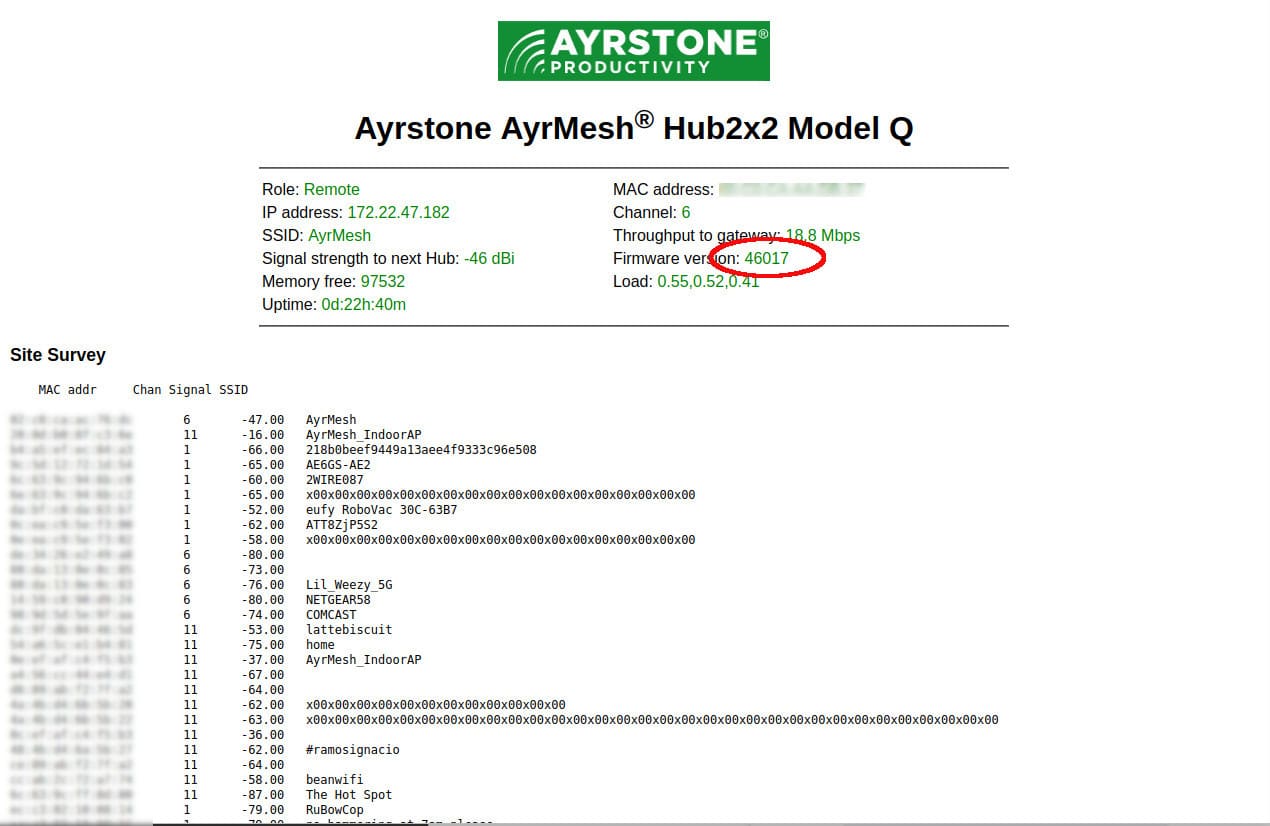
The latest versions of firmware for the various AyrMesh products are:
- AyrMesh Hub2n: 40039
- AyrMesh Hub2T: 43011, 45008, or 48005 (there are actually three different models)
- AyrMesh Hub2x2 (old style with black antennae): 44007
- AyrMesh Hub2x2 (new style, with white antennae): 46027
- AyrMesh Hub2x2C: 47028 or 47029
- Original AyrMesh Receivers: 50022 or 51004 (two different models)
- Recent (large) AyrMesh Receiver: 52015
- AyrMesh ReceiverC: 53005
- Original AyrMesh Bridge: 60021
- Current (larger) AyrMesh Bridge: 62010 or 63004
- Original AyrMesh IndoorAP: 70009
- Original (small) AyrMesh IndoorHub: 71005
- Current (round) AyrMesh IndoorHub: 72010
- AyrMesh HubDuo: 80013
If your device has a version number lower than shown, make sure it’s able to “talk” to the Internet and download firmware updates.
Support: We have a comprehensive support and troubleshooting page. It should help you deal with almost all the possible problems.
Spares and Replacements: Please check Ebay for sales of AyrMesh products if you need replacements – there are still a few new products available from user “ayrstoneproductivity”.
This site will remain functional for several more months to provide assistance for those who need it, but it will disappear forever early next year. We strongly advise you to download the Instructions, Troubleshooting guides, and Manual Configuration Instructions and keep them for your records.
The Ayrstone support site (https://support.ayrstone.com) will shut down at the end of June and all support materials (installation and troubleshooting) will be transferred to this site.
The Ayrstone Blog, of course, will also disappear next year.
Our Guarantee terms have changed: All Ayrstone AyrMesh products come with a limited 30-day money-back guarantee until the end of May. After that, of course, we’ll provide support and exchange products until the end of June, but, after that, we won’t be here any more.
Substitute Products
Unfortunately, we don’t know of any other WiFi products like the AyrMesh system – it was a “zig when the market zags” product. As all the other WiFi companies focused on sites with high “client density” (lots of devices in a relatively small area), we focused on “anti-density” – few devices spread across a potentially huge area (like a farm). And we were pretty much alone in that market.
However, many of our customers were simply using AyrMesh Hubs as simple, high-power outdoor access points, never using the meshing capability to extend those networks with a second Hub. When you need a replacement for your single AyrMesh Hub, any good outdoor WiFi access point with high-gain antennas will work well. We have evaluated the Engenius ENH1350 outdoor access point and the Wavlink AX18000 outdoor access point, and both delivered similar performance to the AyrMesh Hubs.
Many other customers used the meshing to place multiple access points, but were placing them closer together than a mile apart, which is not optimal for the AyrMesh Hubs – this is what drove us to introduce the AyrMesh Hub2x2C and, later, the AyrMesh HubDuo. For installations like this, we recommend the Ubiquiti UniFi system, which is particularly well-suited to users with advanced IT requirements. We have not evaluated it, but the TP-Link EAP-225 Outdoor appears to offer both meshing and cloud-based (or local) central control. We did evaluate an earlier version of the basic hardware, and it was very good.
Unfortunately, we don’t know of any products offering the kind of long-range meshing the AyrMesh Hubs delivered. I had hoped one of the companies offering WiFi solutions or Agricultural products would acquire Ayrstone to continue the product line, but no one has come forward.
The AyrMesh Receiver is really just a directional WiFi client, picking up the WiFi from the Hub and producing an Ethernet port that connects directly to the network. The best substitute we know of that’s generally available is the TP-Link CPE210, which I tested many years ago and found it worked well. There were “Client Premises Equipment” (CPE) units marketed to Wireless Internet Service Providers (WISPs) like the Ubiquiti Nanostation, but they have disappeared from the market. As the 2.4 GHz. band has become unusable for the WISPs, they have moved to higher frequencies. You can find 5 GHz. CPE units that should work well at shorter distances (up to perhaps half a mile) with the HubDuo, and we were considering building a product like that because we found about 75{e689d3074b821621d6151d9fd2f04c90f6f66cf1fcbaeaac053a2d48ff9839d0} of our customers had their receivers within half a mile of the Hub. However, we don’t know of a 2.4 GHz. CPE we can recommend to replace the AyrMesh Receiver.
The AyrMesh IndoorHub is simply a “dumb” (non-routing) indoor access point, with an optional meshing feature. There are many good options here, from routers that have an “AP mode” (which turns off the routing part of the router – ASUS routers all seem to have this feature) to indoor mesh systems like Google WiFi or Eero.
Similarly, the AyrMesh Bridge is simply a non-routing (layer 2) 5.8 GHz. wireless bridge, set to a 10 MHz. channel width to moderate interference on the 5.8 GHz. WiFi band and maximize range. There are numerous wireless bridge products on the market, from simple, inexpensive solutions like the TP-Link Bridge to longer-range, higher-bandwidth solutions from Ubiquiti, to much more expensive high-bandwidth solutions using the 60 GHz. wireless band.
Ayrstone Assets
Ayrstone’s Assets are available – the AyrMesh.com and product codebases, the registered trademarks, and our patent are all available for license or sale.
Our physical assets are being sold from our San Jose, CA office – if you’re in the Bay Area and need some inexpensive office/light industrial supplies, please get in touch.
Open Standards and Open Source
Your investment in AyrMesh is protected because AyrMesh is built on open technologies – 802.11n and 802.11s WiFi and meshing, and 802.3 Ethernet. That means you can replace AyrMesh products with other standard WiFi products and be confident that all your WiFi devices will just work.
All AyrMesh devices use the open-source OpenWRT and Open80211s Linux firmware. This also provides you with two options if you are technically-inclined (or you have a friend who is):
- You can re-flash the AyrMesh hardware with OpenWRT, gain full control of the unit and avail yourself of all the additional features available.
- You can extend your network by flashing other hardware with OpenWRT and configuring it with the parameters from your AyrMesh devices (see the manual configuration menu).
The bottom line here is that open standards and open source protect what you have invested in AyrMesh products, giving you the flexibility to move forward as you please.